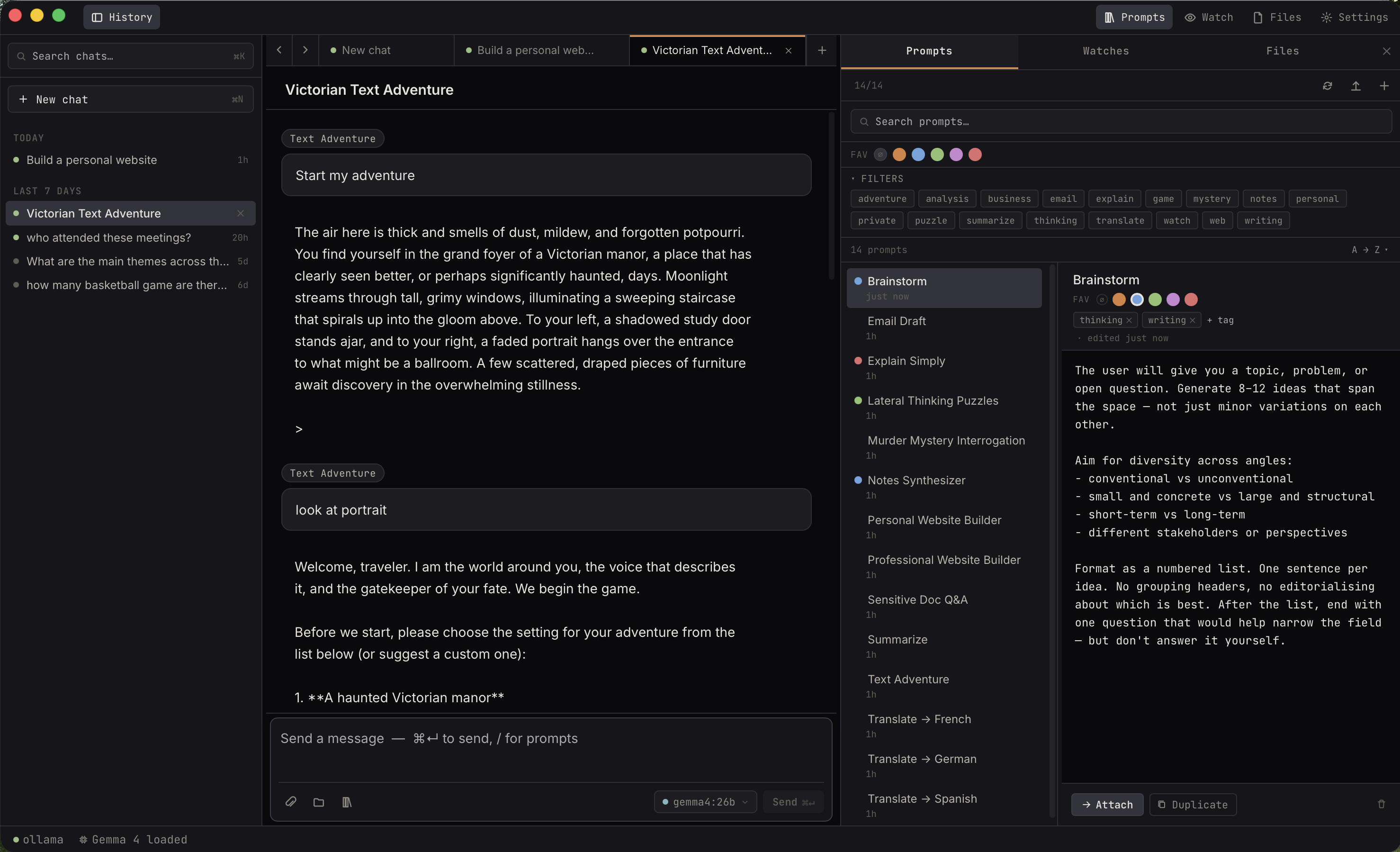
Ekorbia is a lightweight desktop app for private, local
AI — a chat and productivity workspace, built in Rust and
Tauri. On macOS it runs the models for you — pick
one from a built-in catalog, no separate install — and your
conversations, prompts, and indexed files live entirely on
your machine. No cloud. No API keys. No telemetry.
Chat, attachments with citations, watches, and a prompt
library — all running locally on your machine.
01 / on-device
Your files stay home.
Embeddings run locally with
nomic-embed-text. Index your notes, your journal, your
~/Documents
— nothing leaves your laptop.
02 / native speed
Built in Rust &
Tauri.
Streams responses with a stop button. SQLite + FTS5
underneath. The overlay opens near-instantly.
Cold / warming / loaded model state is visible in
the status bar.
03 / no lock-in
Plain markdown prompts.
Prompts are
.md
files with YAML frontmatter on your disk.
Git-friendly. Shareable. Editable in any editor — no
proprietary database to hold them hostage.
For the local-AI obsessed
Three things you get from staying local.
●
Your data never leaves your machine
Every chat, every embedding, every saved file lives
in your platform's app-data directory and nowhere
else. Models run locally — the only time Ekorbia
touches the network is to download a model
you choose, poll the URLs you add
to Watch, or reach a custom endpoint if you
set one up.
●
No telemetry, no analytics, no accounts
There's no sign-up, no API key, no usage tracking,
no crash reporter phoning home. The app doesn't even
know your name. Download the installer for your
platform, install, run — that's the entire
onboarding.
●
A memory file the model can read but never write
Ekorbia injects a markdown file of your choosing as
system context on every send — facts about you,
project conventions, writing style. The
write_file
tool is sandboxed away from it. The memory is yours
to evolve; the model only sees it.
Need to disappear entirely? Start a
private chat
— nothing touches disk at all.
Quick-query overlay
Press ⌘⇧Space. Ask anything.
Never lose focus.
A transparent spotlight-style panel that pops up
over any app and quietly answers — without stealing
focus from your editor, your terminal, or your
browser. Inline model picker, prompt picker, and
streaming responses. Auto-hides on blur or
esc. (Default hotkey is
Alt+Space on Windows. The overlay isn't
available on Linux yet.)
Keeps its own model preference, so you can run a
heavy reasoning model in the main window and a tiny
fast one in the overlay. Click
Send to main
to escalate any overlay exchange into a full
multi-turn chat in the main window.
explain CRDTs in plain english
⌥ gemma4-e2b/ explain-simply↩ send · ⎋ close
Transparent vibrancy window · near-instant ·
never steals focus
Voice input
Just talk. Nothing leaves your machine.
Click the mic
in the composer, speak, and the transcript drops in
at your cursor. Speech is transcribed entirely
on-device with
whisper.cpp
— no audio is ever uploaded. On Apple Silicon it's
Metal-accelerated, so a short dictation transcribes
in a few hundred milliseconds.
It's built to be hands-free: dictation stops on its own a moment after you
pause, and auto-send submits the finished message —
speak, and it goes. The same mic lives in the
quick-query overlay, and a global hotkey
(⌘⇧V) pops the overlay open
already listening, so you can dictate from
any app without clicking anything first.
Multilingual Whisper models cover
99 languages, with auto-detect and a
Translate to English
toggle — speak in one language, land the transcript
in another.
macOS only for now — the mic permission prompt
appears the first time you record.
Composer · dictating
Summarise the weekend plans from these
notes
🎤Listening… 0:04⎋ cancel
auto-stop on
pause auto-send
base.en · on-device
Transcribed with whisper.cpp · Metal-accelerated ·
nothing uploaded
Tabs & full-text search
Every conversation, instantly findable.
Multi-tab chat with independent histories per tab.
Tabs with attached files show a paperclip + count so
you can see context coverage at a glance. Every word
of every reply is BM25-ranked and full-text
searchable via SQLite FTS5, indexed live by triggers
— no batch jobs, no stale indexes.
Multi-word queries AND together, prefix matching is
automatic, and clicking a result opens the parent
chat with the query terms highlighted inline.
History sidebar · search
⌕findable12 results
Titles
▸Everything stays findable — chatyesterday
Messages
▸"…every reply is BM25-ranked and
findable
via FTS5…"
▸"…so a
findable
index lives in the same SQLite
DB…"
Click the lock icon beside
New chat
in the sidebar to open an ephemeral session.
Messages, attachments, file saves — none of it
touches the SQLite database. The conversation lives
only in memory and disappears when you close the
tab.
The composer hides the paperclip and folder buttons
(attachments would persist to disk), the export
kebab is hidden (nothing on disk to export from),
and a lock glyph appears on the tab and as a banner
above the composer so you're never visually confused
about which mode you're in.
Tab strip · private chat
▣
Q4 planning
📎 3
🔒
Private chat
▣
Resume review
🔒 Private chat — nothing in this tab will
be saved to disk.
Switching tabs preserves it in memory;
closing the tab erases it.
Prompt library
A library of prompts that live as files.
Every prompt is a markdown file with YAML
frontmatter in your configured folder —
git-friendly, shareable, editable in any editor.
Five colored favorites for personal buckets, flat
tag filters, full-text search across name, body, and
tags. Type / in the composer to invoke
one inline.
28 built-ins ship with the app, including Album Deep Dive, Brainstorm, Cliff
Notes, Cover Letter Writer, Devil's Advocate,
Lateral Thinking Puzzles, Log Triage, Murder Mystery
Interrogation, Notes Synthesizer, Resume Coach,
Sensitive Doc Q&A, Text Adventure, Tone
Reframer, Translate (ES/FR/DE), and more.
Composer · type / to invoke
/research
Album Deep Dive↩
Brainstorm
Cliff Notes
Devil's Advocate
Notes Synthesizer
Resume Coach
↑↓ navigate · ↩ insert
· esc close
Compare models
Two or three models. One prompt.
Click the
columns
button in the sidebar, pick 2 or 3 installed models,
and the chat splits into adjacent columns. Send one
prompt — every model streams its response in
parallel, so you can watch them think side-by-side
instead of swapping tabs to re-run the same
question.
When one answer is clearly better, click
Keep this
beneath it. The losing columns collapse, the chat
transitions back to a normal single-model
conversation with the kept model, and the next
message goes only to it — no wasted tokens, no
cluttered history.
Comparison chat · 2 models
You
Explain monads in one paragraph.
gemma4-12b▌ streaming
A monad is a design pattern for
chaining computations that each
return a wrapped value, letting you
compose side-effects without
unwrapping them by hand…
gemma4-e4b✓ done
Think of a monad as a burrito for
values: it wraps a thing in context,
and gives you one operator (>>=) to feed that thing through the
next step without ever unwrapping.
Click Keep this and the chat
continues with gemma4-e4b alone.
Screenshot → chat
Press ⌘⇧1. Drag a region. Ask.
Hit the screenshot hotkey from any app — Ekorbia
invokes macOS's native region selector (the same
crosshair you already know from
⌘⇧4). Drag a region, press
Space for window mode, or
esc to cancel.
The captured PNG opens in a fresh chat tab with the
image already attached as a vision attachment. If
your current model can't see images, Ekorbia
auto-switches to one that can — and tells you which
one via a toast.
macOS only for now — one-keystroke screenshot
capture on Windows and Linux is on the roadmap. You
can still drag any image into a chat on every
platform.
New chat · screenshot.png
🖼
Screenshot · 2486 × 1428
/var/folders/T/scr-202611.png
VISION
What's wrong with this chart?
▸
The y-axis isn't zero-based, which visually
exaggerates the trend. The gridlines are
also missing a unit label…
✓ Switched to vision model: gemma4-12b
Watch
Ambient background work, on its own cadence.
Point Ekorbia at a folder, an RSS feed, or any
public URL. It polls on its own cadence, summarises
only what's changed, and appends each summary to a
notes file you can chat with later. Diff-mode URL
watches send only the added/removed lines to the
model — ideal for changelogs and release notes.
Optional
native OS notifications
(Notification Center on macOS, libnotify on Linux,
toast on Windows) — coalesced per poll cycle, so
five new files become one banner, not five.
Watches · activity feed
🌐example.com / changelog"v0.7 adds nested transactions and a
new diff mode…"2m
📡Hacker News
🔔"Show HN: a new local-first sync engine
for…"14m
🌐status.cloudflare.com"Resolved: increased error rates in IAD
region"1h
Diff mode payload
## Added+ Support for nested
transactions+ New `--diff` flag on the watch
CLI- Deprecated: `legacy_mode` config
key
Real use-cases · all 6 ship as built-in prompts
🌐
Release-notes diffs
Watch a project's CHANGELOG and get a diff-only
summary every time a new version ships.
🌐
Rental / listing watcher
Poll a Craigslist or marketplace results page;
get pinged the moment new listings appear.
📡
Research paper tracker
Subscribe to an arXiv RSS feed; abstracts
summarised into a notes file, with link-follow
on short feeds.
🌐
Wikipedia edit watcher
Tail an article's revision history; get notified
when contested edits land.
🌐
Cloudflare / GCP uptime
Status pages summarised on every change —
incident headlines, resolution timestamps,
affected regions.
🌐
Price / availability watcher
CSS selector narrows to the price element; pings
you when the number drops or an item comes back
in stock.
Files & folders
Attach a folder. Ask a question. Get cited answers.
Attach
.md,
.txt,
.pdf
files, images, or whole directory trees. Small files
are inlined verbatim; large ones are chunked,
embedded locally with
nomic-embed-text, and the top-6 most relevant chunks per query are
retrieved at send time.
Replies come back with inline
[N]
citations that map to a Sources footer of clickable
chips. Folder chips expand to show which sub-files
matched and their relevance scores.
Shift-click any chip to reveal in
Finder.
Re-indexing is incremental — change one file in a
500-file folder, click ↻, only that file re-embeds.
Assistant reply · Sources footer
The chunker preserves paragraph boundaries
with a 100-char overlap
[1], and embeddings are stored as packed
f32
blobs for brute-force cosine retrieval
[2]. The folder walker skips
.git,
node_modules,
target
by default
[3].
Tool-capable models (Gemma 4, llama 3.1+, qwen 2.5+,
…) can call
write_file
during a chat to save any output — HTML, CSS,
Python, configs, scripts — directly to a per-chat
output directory you choose. First save asks
permission; the choice sticks per chat.
Every write goes through a server-side
sandbox
that rejects
.., absolute paths, NUL bytes, and symlink escapes —
with unit tests for every rejection path. Writes are
atomic (temp + rename), so a crash mid-write leaves
the previous version intact.
Models without tool support get
per-fenced-block Save buttons
instead — same sandbox, same flow.
Files panel · per-chat output dir
~/.../Outputs/site-redesign/Change…Reveal
⌘index.html2.1 KB · v35m ago
⌘styles.css847 B · v25m ago
⌘build.sh312 B11m ago
gemma4-12bTOOL
badge appears on the model picker when the
active model supports tool use
Memory file
One markdown file. Every chat.
A single markdown file Ekorbia injects as system
context on every chat send. Useful for habitual
context you'd otherwise re-type — facts about you,
project conventions, writing style, things the model
needs to know but you shouldn't have to repeat.
Read-only from the model's perspective
— the
write_file
tool can't touch it. The memory is your shared
context with the model, not something it gets to
rewrite on its own. Edit it in any text editor, any
time.
~/Documents/Ekorbia/memory.md
# About me
I'm a backend engineer working primarily in
Rust
and Python. I prefer concise code review
feedback
— call out problems without restating the
patch.
# Writing style
- Active voice, present tense - No marketing fluff ("seamlessly",
"powerful") - Em-dashes for asides, not
parentheses
# Projects
- ekorbia — a local-AI desktop app (Tauri +
React) - forager — RSS reader I'm rewriting in
Rust
3.4 KB · soft cap warns over 10 KB
Polished chat UX
Streaming, edit-retry, export, status.
Replies stream as they're generated; a
Stop
button freezes what's been written so far and marks
the partial reply as
Stopped
so you see exactly where you cut it off. Click the
pencil on any past user message to edit and resend;
click retry on the last assistant reply to
regenerate.
Export any chat to Markdown (clean role-tagged
sections) or JSON (full row preservation with tool
calls and timestamps). And the status bar shows the
model's state — cold, warming,
loaded — so there's no wondering why the
first token took a few seconds.
Status bar · model state ladder
Cold start
gemma4-12b ·
cold
Warming up
gemma4-12b ·
warming
Ready
gemma4-12b ·
loaded
Indexing in the background
Indexing docs/ — 42/87
The same status bar shows a Stop button
while a reply is mid-stream.
Themes
Five themes. Pick your weather.
One Dark and One Light for the editor-theme crowd.
Ayu Dark, Ayu Mirage, and Ayu Light for the warmer
palette folks. Switch in Settings — every panel,
chip, badge, modal, and syntax-highlighted code
block follows.
One Dark
One Light
Ayu Dark
Ayu Mirage
Ayu Light
Background · accent · link · keyword
Common questions
Things people ask.
Is Ekorbia free?
Yes. Ekorbia is free, open-source under the
MIT license, with no subscription, no API key, no usage
tracking, and no telemetry. Download the
installer for your platform (.dmg,
.msi, .exe,
.deb, .rpm, or
.AppImage) from the Releases page
and you're done.
Does Ekorbia work offline?
Yes. Ekorbia runs models on your machine, so
once you've downloaded a model it works fully
offline. The only times it uses the network are
to download a model you choose, poll the URLs
you add to Watch, or reach a custom endpoint if
you configure one. There's no cloud component.
Does my data leave my computer?
No. All conversations, attachments, embeddings,
prompts, and saved files live in your local
Application Support directory and in your chosen
prompts folder. Ekorbia has no analytics, no
crash reporter, no accounts, and no servers. The
full source is on
GitHub
if you want to verify.
Which models can I use, and do I need Ollama?
On macOS you don't need Ollama — Ekorbia ships a
built-in catalog that downloads in-app: curated
Gemma 4 models (all vision-capable) plus
nomic-embed-text for folder-RAG
embeddings.
You can also switch to Ollama or any
OpenAI-compatible endpoint under
Settings → Backend
and use any model they run — on Windows and
Linux that's currently how you supply models.
Vision-capable models can see attached images;
tool-capable models get a
TOOL
badge and can write files to disk.
Are the installers code-signed?
Not yet — on either macOS or Windows.
On
macOS, Apple Developer ID is required for signing
and the project doesn't currently carry that
membership. Gatekeeper shows a warning on first
launch (or refuses outright with a "damaged"
message — the
README has a one-line xattr fix).
On
Windows, SmartScreen will warn on first launch. Click
More info → Run anyway to get past it.
Linux
bundles don't need signing in the same way;
.deb, .rpm, and
.AppImage install cleanly.
If you'd rather not run unsigned binaries on
macOS or Windows, you can
build from source
instead: cargo tauri build
produces a locally ad-hoc-signed binary.
How is Ekorbia different from Ollama, LM Studio, or
Open WebUI?
Ekorbia runs models itself — on macOS it bundles
an inference engine and a model catalog, so
there's nothing else to install.
Ollama
and OpenAI-compatible endpoints are optional
backends you can switch to. On top of that it's a
workspace: multi-tab chat, folder attachments
with cited RAG answers, RSS/URL watches, and a
markdown prompt library.
LM Studio
is a closed-source model workbench; Ekorbia is
MIT open-source and built for everyday
productivity rather than model tinkering.
Open WebUI
is a self-hosted web UI you run as a server;
Ekorbia is a native desktop app — one installer,
no Docker, nothing to maintain.
And unlike ChatGPT or Claude on the web,
everything stays on your machine: no account, no
API keys, no data leaving your computer.